
If you're having trouble controlling your K4Community smart home devices with K4Community Plus be sure to:
-
Confirm that the device you're trying to operate your smart home with is online. If the device you're using is not connected to the internet, you won't be able to control the smart home devices.
-
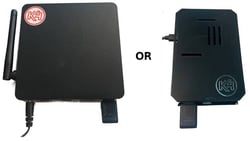
Confirm your K4Community smart home controller is online.The K4 controller (pictured here) is the device that allows communication to your smart home devices. If it is not online, you won't be able to control your smart home.
- Reboot the controller by unplugging for 30 seconds and plugging it back in
- Wait about 2-3 minutes and try again.
If you're unsure of where the controller is located or if it's in a location that you can't safely access, please reach out to someone on staff at the community for assistance.
- Confirm the device is a K4Community smart home device. Not all devices in your home are K4Community devices. Only devices that are part of the K4Community network are available to operate through K4Community Plus.
- Try closing and reopening your K4Community Plus app. Sometimes app-related issues are easily fixed by closing and relaunching the app.
If you're still having trouble after trying these steps, please reach out to our Support team and we'll be happy to investigate further for you!
Need help? Our friendly Support Team is here to assist you.
💬 Chat
Click the Chat icon in the bottom-right corner of your screen to start a conversation with a support representative.
📱 Phone & SMS*
Call or text us at (855) 876-9673.
Send us an email at support@k4connect.com, and we'll get back to you as soon as possible.
If you're unsure which contact method to use, chat is usually the fastest way to get assistance.
*K4Connect provides customer-initiated text message support. By texting K4Connect Support, you consent to receive text messages from K4Connect related to your support request, including responses and follow-up messages. Opting in is not a condition for purchase or service.
K4Connect does not send unsolicited or promotional text messages. Message frequency varies based on your support needs. Message and data rates may apply. Reply STOP at any time to opt out of support text messages.
Comments
0 comments
Please sign in to leave a comment.