
Newest Team Hub Release Notes
Click here to learn about our most recent updates in the 5.0.5 release
Where can I find the latest training videos?
We're adding new videos on key functionalities every few days here Teamhub5.0 Best Practices Playlist
Look for video links in questions below for quick, topical problem solving!
.png?width=670&height=214&name=team%20hub%2050%20playlist%20(1).png)
How do I get logged into the new Team Hub?
- Type teamhub.k4connect.com into your browser or follow the link here.
- If you experience login issues, clear your cache and try again.
- Reset your password.
What if I’m having trouble getting into the App?
Staff: Reset your password.
Residents: Community K4 Admins or Support can generate an app code.
Other Tips to refresh the app:
Visit your app store and check for an update.
If you haven’t used your app in awhile, or since the last update, you may see a pop-up message that tells you an update is downloading.
- Allow a few minutes for this download.
- Close and reopen the app.
If you continue to experience app access issues, delete & redownload the app with these instructions & links.
What’s the difference between Posts and Notices?
|
Notices |
Posts |
|
| Allows staff to manually publish content to the app | ✅ | ✅ |
| Share Information by Care Setting, Contact Type, & User Groups | ✅ | ✅ |
| Allows push notifications | ✅ | ❌ |
| Can be filtered to show content published to an individual resident's feed | ✅ | ❌ |
| Allows posting content to a single resident's feed | ❌ | ✅ |
| Supports posting to Content Groups/Folders (Dining Info, Resources, etc.) | ❌ | ✅ |
| Shows content published to Plus app via FusionOS integrations (i.e. work order status, meal balances, etc.) | ❌ | ✅ |
Setting a Notice Priority to Urgent triggers a push notification to the Plus app. Low, Medium, & High priorities can be configured to integrations that drive notifications. These can be customized for notifying users of the Plus app as well as K4 Voice devices. At this time Urgent is the only priority with a configured behavior which is triggering push notifications to the Plus app
For a community with many integrations active, the Post view can become very busy-looking. Once you have your admin permissions configured, you may choose to make Posts Read Only for your team and do most of your proactive communication from Notices.
Can a post still have a push notification?
No, Posts do not offer push notifications, only Notices do.
Digital Signage: How can I design & Publish to Digital Signage?
Click this link for a short video on how to publish a new design to your Digital Signage. Learn how to
-
Create & size a new design
-
Publish to digital signage locations
- View slideshows currently running on Digital Signage
- Convert a Slideshow to the Designer to repurpose it for a new Post or Publishing
What is the difference between Destination and Destinations?
Destination is a digital signage or direct broadcast location. “Destinations” is a label you can create and use to group together multiple Destinations inside Team Hub to support publishing to them conveniently at one time from Publisher, Canva, or the Teamhub 5.0 Designs space.
How do I unpublish Designs from Digital Signage/Direct Broadcast?
- Remove select content from Slideshow. Click the edit pencil, go to the Visibility tab, and delete from the destinations listed for that slideshow with the 3 dots for that module on the right. Save and your remaining destinations will continue to show this content. You can remove more than one destination at a time before saving.
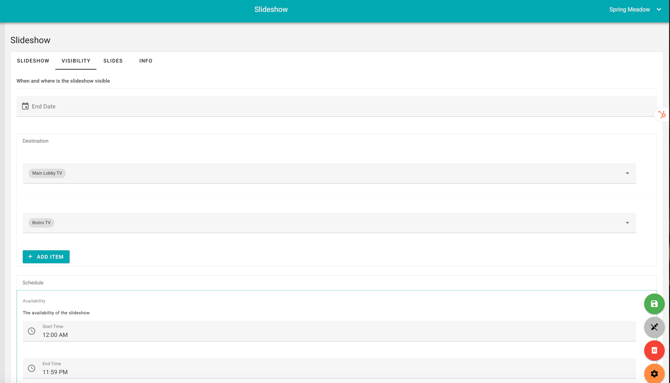
- Remove all slideshows from a destination by selecting a Destination. Select the remove content button, clears all currently scheduled content.
What’s the Difference between Designer & Slideshow?
Designer brings new design functionality, including expanded fonts, font sizes, alignments, and access to 1000s of new images.
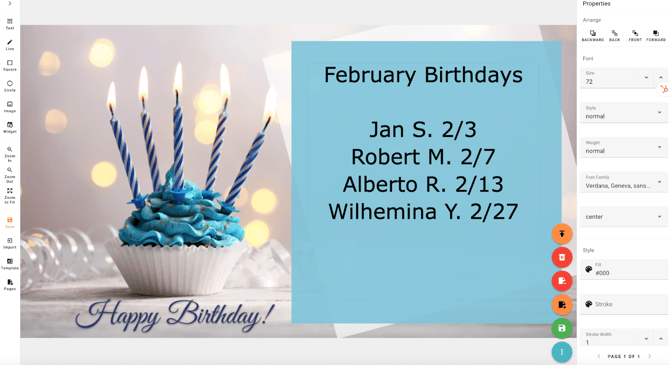
Slideshow is the home for past Designs migrated to the new platform. New design work or updates are done in the Designer, then published to Slideshow for placement on Digital Signage.
How do I get my EXISTING designs into Designer?
Use the Magic Wand on the right to import slides to the Designer.
Slideshows cannot be migrated back once migrated to Designs. Only existing static designs can be re-posted from Slideshows.
How do I Copy a Design for Reuse?
Simply use the Import button at the lower left of the Designer. This video shows you how!
Why did Images, Files, Videos, & Links move to the Media Library?
We’ve expanded the number of places you can use and re-use images, links, and files, and we needed to create a central repository that can be accessed for adding to Menus, Notices, Posts, Digital Signage, Resources, Thumbnails & Group Folders. The Media Library will also support future integrations & allow multi-site organizations to deploy content across communities for community use.
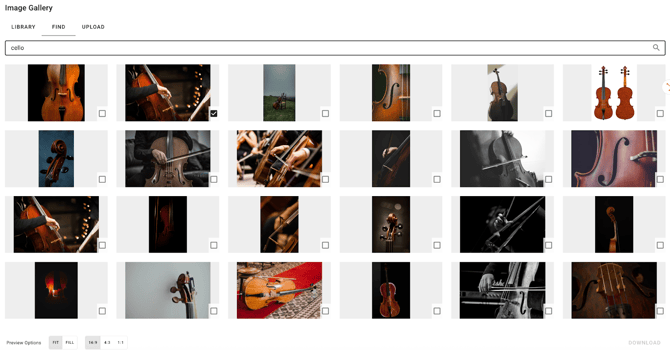
How do I find fresh images?
Whether you want to accompany a Menu Item, Event Notice, or URL Link Posting, you can easily search through thousands of free images for just the right one. Check the box of the desired images & select Download. Viola! The image is in your Image Gallery Library.
Dining & Menus
How do I add new menu items? What about new Restaurants or Menus?
Learn how to add new items, nutrition, ingredients, allergens, and availability in this video.
How can I enter a repeating weekly or monthly menu? What about Specials Menus?
Set up Always Available, daily menus, rotating menus, and special event menus just once, and residents can see those items on the daily menu just when they're served. Learn more about availability in this video.
Event & Calendar Management
Click here to learn about our 5.04 release expanding Event, Sign-Up, & Resident Check-in Capabilities!
How do I create & publish a new event on the K4Community Virtual Calendar?
Learn how to set up a new event from scratch, including repeating events in this 3-minute video. Learn about color coding with Event Types, how to filter your Teamhub calendar view.
How do I set up a unique Additional Occurrence or Cancel a Repeating Event?
Cancel, edit a date or title, or change the time of a recurring event. This feature is designed for changes that are on the same day of the week as the repeating event, and will carry your sign-ups to the new instance. For a one-off event on a different day, set up a one-time event with a similar title.
Watch the video on Managing Reoccurring Events.
How can I print my calendar using the Calendar Widget?
Click on this 5-minute video to see how to print a monthly calendar using the calendar widget. We'll show you how to display and hide Event Type keys, Location keys, and change your calendar & font sizing.
Users: Residents, Families, Staff, & Other Contact Types
How do I add & customize Residents & New Contact Profiles?
Learn how to set up a new profile, manage resident moves, and more!
Why do Staff see @K4Connect.Private emails for some residents in the Resident Directory? Do Residents see these too?
Resident profiles in K4Community are generated based on emails as a unique identifier.
-
For communities with a CRM or EHR integration that passes new move-ins to K4Connect through FusionOS, this email comes from that system.
-
For communities that directly enter move-ins to K4Community, this entry is the source of that email. However, we know not all residents have an email address.
-
K4Community generates a unique identifier for residents without an email using the K4Connect.private designation. K4 surfaces this in the Staff view of the directory as a prompt to add resident email addresses.
-
Visibility of these Unique Identifiers are NOT visible to Residents.
I access multiple communities in Teamhub. How do I navigate between them?
Watch this short video to learn how to navigate between communities and confirm or select your default communities.
Next Up: More on Dining & Permissions. Check back soon!