
Calling Other Residents
With your K4Community Alexa, you can make calls to other residents on their K4Community Alexa devices as long has they haven’t opted out of the Directory. Residents in the Directory who have K4Community Alexa devices can be identified by the Alexa Echo logo (a small, blue circle) on their profile. If you call a resident and Alexa says “I can’t find that name in your contacts." that means they've opted out of the directory or they don't have an Alexa assigned to their home.
To call another resident, simply say one of the following,
- Say, "Alexa/Echo, call [resident name]". Alexa will recognize the resident's name based on how it is listed in the K4Community resident directory. For instance, if their name is William, but they're listed in the directory as Bill, you'll need to use the name Bill to make the call.
- Confirm that Alexa is calling the correct resident. This step won't always be necessary, but if the community directory has multiple residents with the same name, she will clarify which resident you want to call. For instance, if you ask her to call Sandra and there are 2 residents named Sandra in the directory, Alexa will list the residents with that name along with their last name to clarify who to make the call to.
To answer a call from another resident
- Say, “Accept the call.” or “Answer the call”. On Echo Show devices, you can tap the green Accept icon
There is no limit to the number of Echo devices that can communicate to one another via the K4Community voice skill.
The Alexa will illuminate a green ring or light to indicate that there is an active call. For more on what the various light colors mean, take a look at the What do the lights on my Alexa mean? question on the Resident FAQs
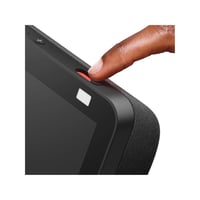
If both residents have Echo Show devices, the call will be automatically established as a video call. The camera can be disabled on an Echo Show by toggling the camera cover on the top-righthand side of the device.
Calling Community Phone Numbers
Your community may have phone numbers programmed into your K4Community Alexa/Echo device. To call the numbers, simply say, "Alexa/Echo, call [location]." For example, "...call front desk." or "...call the salon.".
If you're unsure of which numbers are available to call, ask your community staff or reach out to K4Connect Support and we can look that up for you.
Hang up the call
To hang up the call simply say any of the following:
- Alexa/Echo, end call.
- Alexa/Echo, hang up.
- Alexa/Echo, stop.
Alexa calling FAQs
Is there voicemail?
No. Alexa calling does not offer voicemail
What is the experience for a resident who is receiving a call?
The Alexa device will chime and announce “[Resident name] is calling.”
What is the experience if the resident doesn’t answer the call?
Alexa will respond with “The contact is not available”
Is there a busy signal if the resident is already on another call?
No. The response will be the same as if they didn’t answer the call. “The contact is not available.”
How do I answer a call?
Say, “Accept the call.” or “Answer the call”. On Echo Show devices, you can tap the green Accept icon
Can a resident decline a call that is actively ringing?
Yes, just say “Alexa, stop.” or “Alexa, decline the call.”
Is there any difference if an Echo Dot calls an Echo Show or vice versa?
No. The calling/audio experience is the same either way. Calls between and Echo Show and an Echo Dot will of course not have the video element.
What will happen if I ask to call a resident who has the same name as another resident?
Alexa will differentiate the residents by reading their names with their room numbers and ask you to confirm which resident you’d like to call.
Can residents call other residents using their room number?
No. Voice calls can only be made by asking for the resident by name.
Comments
0 comments
Please sign in to leave a comment.